

I’m usually pretty good at catching phishing schemes. The dead-giveaway? Usually a gmail address. But be warned, professional scammers are experts at social engineering. They know how to push you buttons. I’m sharing this to maybe prevent some other person from a similar experience, which was far from pleasant.
I have never had much luck with advertising but decided to give Facebook a try to gather order for the pre-release of my Curse of Dead Horse Canyon Trilogy ebook. I created a post (shown above) and submitted it with a campaign limit of $30. The post was accepted and their AI even created a couple other texts for it so it wouldn’t be repetitive. So far so good.
It no sooner went live and I get an email, supposedly from Meta, telling me my post violated their community standards with a bunch of nonsense about copyright violation and all sorts of other stuff you see below. My first reaction was anger followed quickly by frustration.
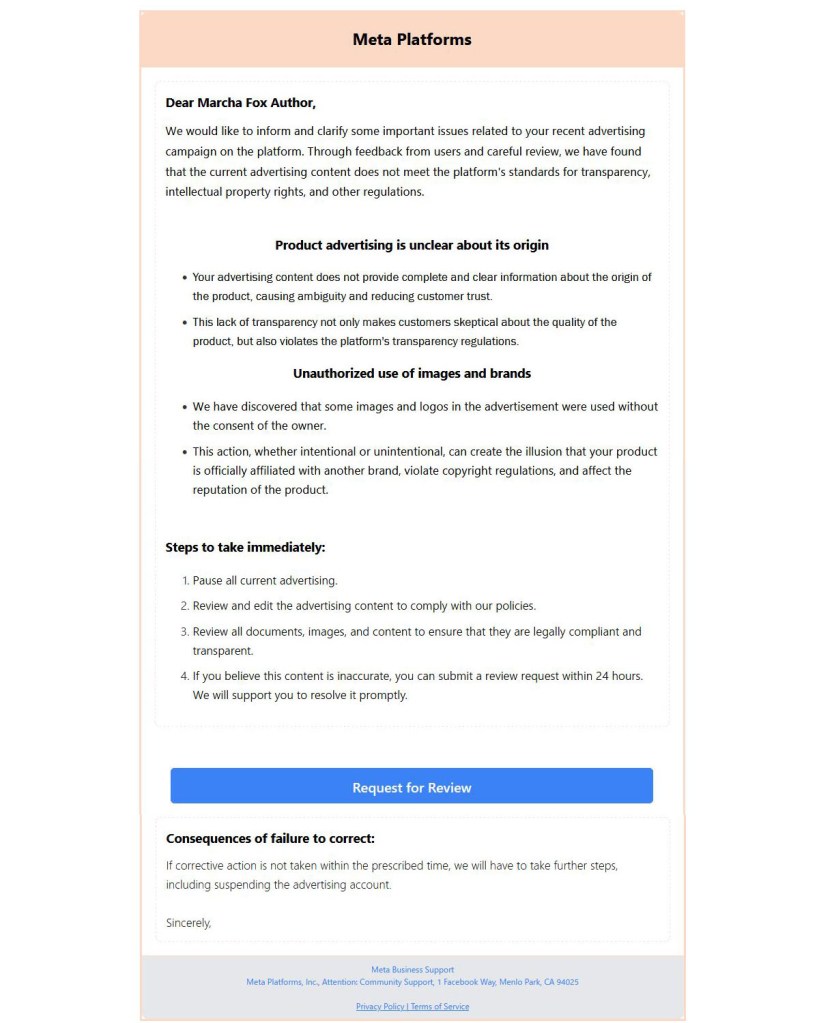
Why did they accept the ad, then reject it? Why didn’t they say something first?
Meanwhile, I set out to correct it and clicked the email’s “Request for Review” button.
What followed was a form where I had to fill in all my Facebook information, i.e. preferred emails, date of birth, and of course, my password, along with why there was nothing wrong with my post.
Big mistake!
When I went to my Facebook account to check on the ad, it was running and everything looked fine.
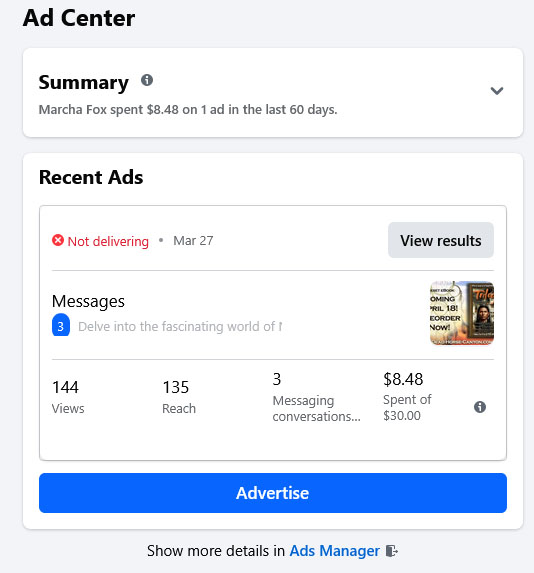
What was going on?
About then I realized what happened. I looked back at that email and saw it came from a gmail address. After slapping myself upside the head, I set out to do what I could to preclude what was sure to follow.
In other words, with access to my Facebook business account they could easily find my credit card information.
I cancelled the credit card, which of course also cancelled my ad for nonpayment. Not wanting to do that, I added my PayPal to pay one of the invoices that was around $30 and looked legitimate, though a bunch of other charges were starting to accumulate that I didn’t understand. I figured if I paid one it would at least turn the ad back on.
A few had hit my Discover Card, too. When Discover texted me whether the first charge was okay, I responded it was, since I hadn’t yet figured out what was going on, much less expected additional charges.
Being rattled already, combined with the complexity of the Facebook/Meta business site, it was impossible to figure out what was happening or find the right menu to do anything about it.
I did discover some unknown Muhlenberg Life Company in my business profile with a bunch of obviously fake names and emails that I was unable to delete.
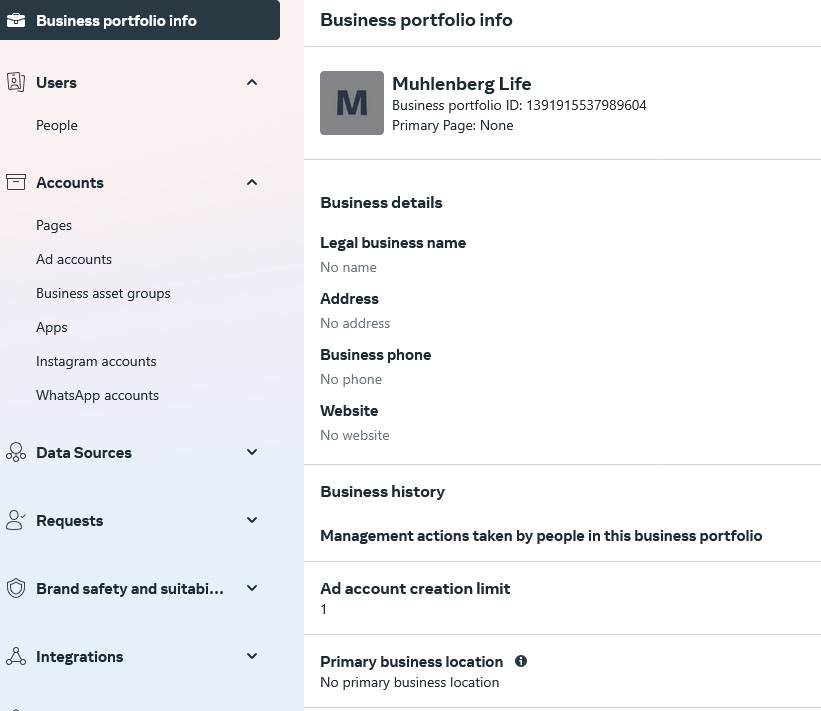
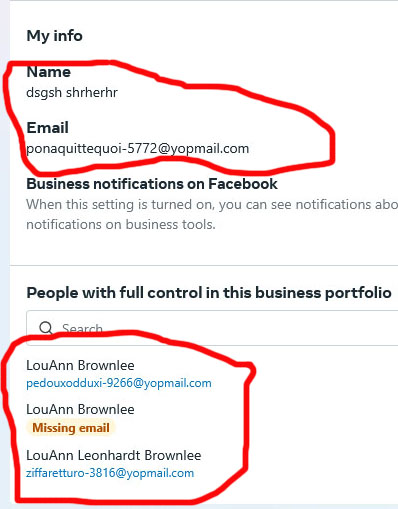
Then I realized Meta was charging my PayPal account–charge after charge after charge–the balance dropping to zero before my very eyes!
OMG!
I took what was left and sent it to my son-in-law to keep them from getting it all. Then I really panicked when I realized my bank account was also on PayPal as backup! Holy crap! When Pay Pal went to zero they’d start in on my bank balance! Then I really panicked, but was able to delete my bank from PayPal before that happened, thank heavens, and my Discover card on there was already cancelled.
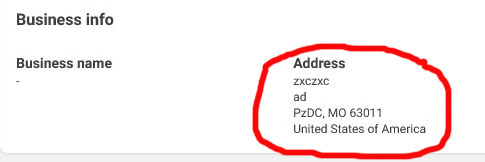
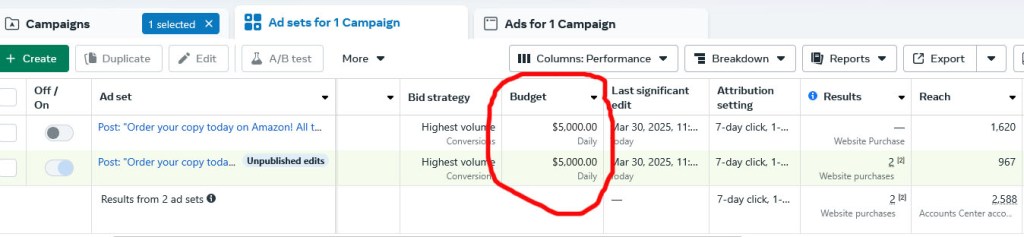
Meanwhile, further digging on the Meta site indicated another ad on my account I didn’t place and couldn’t open, but had a daily spending limit of $5,000!
Meanwhile, I was getting more messages through Facebook and Instagram with the same bogus message with minor variations indicating they were from other people! By then I’d figured it out and fired back a rather nasty reply.
So consider yourself warned that a multitude of low life out there is on to this scheme!
The fact that Meta has no means of contacting an actual person or even a chatbot, my only choice was to send a frantic message to Meta about the situation. Then I went about changing passwords to just about everything.
nd by the way, that was done on Facebook very early on, but somehow these sleazeballs still had access to my account, which was apparent when I saw a transaction log of when they changed the spending limit. My daughter pointed out that I may have had to check an option to “log out of all devices” after I changed the password, but I didn’t see that option on my desktop computer, but it must have allowed them to remain logged in or perhaps in long enough to see the new password.
Several hours later I got a message from Meta. They’d investigated, found my account had been compromised (duh) and refunded all the bogus charges.
Whew!
However, this did nothing for the years it felt like were stolen from my life from the stress or the fact I still have to deal with getting a new Discover card, changing the number for all the utility companies and other services that go to that card, and probably doing the same with PayPal, though if I’m lucky, the regular charges may come through okay. As long as it’s not Meta!
I snarled when I saw PayPal took a fee from when I sent the remaining balance to my son-in-law. I don’t know about you, but if a digital currency will help us exchange funds without these ridiculous fees all over the place, I’m in.
I’m grateful this turned out to be no worse than an afternoon spent in a state of sheer panic. Too many are not so lucky. I do have fraud protection through my Discover Card, but if they’d gotten to my bank account I don’t know just how much that would have covered since I’m sure the coverage has a limit.
I still wonder what that other ad might have been and what they gained from it, if anything. When they discovered my Discover Card was no longer accessible was it simply retaliation?
Lessons learned:
1. Never advertise on Facebook. Period. Maybe it works for some, but unless you have thousands upon thousands of followers or already a best selling author it’s not likely to be effective. Looking at the statistics on there for when they were posting like crazy was pretty telling. Two responses with over 900 impressions?
C’mon!
I should have known because it has never done me any good in the past, making me guilty of violating Einstein’s statement, “Insanity is doing the same thing over and over and expecting different results.”
2. If you use PayPal, rethink those backup payment sources! After they wipe out the balance, charges will go to your credit card or, heaven forbid, your bank! Don’t be naive to how easy it would be to empty it out once they get access.
3. Pay attention to the authenticity of any email, no matter what the circumstances. AI has made it not only possible but way too easy for scammers to make them look legitimate.
They got me with the phishing email because it was timed perfectly. I reacted exactly as planned, wanting to rectify the situation and handing over everything they wanted. These scumbags are professional thieves. They’re tech-savvy and know how to dupe people. Every time I get a phishing email I report it to reportphishing@apwg.org. I have no idea whether they do anything about it, but it may at least get it listed as a scam somewhere.
4. Don’t leave credit card information on social media sites where someone can access it if they hack that account. I have two-factor authentication and do not know how they managed to get in with just my password, but somehow they managed it. If perchance you do run ads, I recommend entering the information when its needed versus leaving it out there.
5. Pay attention to those mass “Data Breaches” that happen all the time with major corporations. Changing your passwords when that happens is a nuisance but highly advised because you don’t always know exactly what they got. Once they have one password, there’s no telling how many other things they may get to. We tend to be too trusting and casual putting that information out there.
6. Be sure to protect your credit cards, even when they’re in your wallet. Shields that look like another credit card can prevent the RFID chip from being read remotely, even by someone you pass on the street. There are wallets available as well with that protection built in.
7. When your credit card company messages you about a charge, give it serious thought before responding. If nothing else, they’re acutely aware of frauds and are likely to know something you don’t.
8. If you ever have to change your Facebook password, be sure to log out from all devices first.
I shared this harrowing experience in the hope it may help someone out there avoid such a debacle. I’m usually smarter than this, but they suckered me in. Just like the rogue movers who scammed me two years ago when I moved from Texas to New York. (You can find my blog about that here.) Do yourself a big favor and learn from my mistakes. If everyone was smart enough not to fall for their tricks and it wasn’t profitable, they’d go away. We must do our best as individuals to make that happen given the sorry state of the world these days.
On a side note, switching to my persona as a professional astrologer, the worst of this has developed during the astrological transit of Neptune through Pisces, which has placed the planet under a deceptive fog beginning April 2011 through August of that year. Then he went retrograde and backed into Aquarius until February 2012 when he returned to Pisces. Gratefully, this is about to end when Neptune goes into Aries today (March 31, 2025).
Yay!
Be warned, however, that Neptune will return to Pisces for a short jaunt from October 23 until January 27, 2026, then eventually return to Aries which will last until May 23, 2028, when he goes into Taurus.
Historically, Neptune went into Pisces the last time February 17, 1848. Needless to say, as an outer planet of our solar system, it moves very slowly. Retrograde motion kept him in Pisces until April 12, 1861, when he first dipped into Aries–the very day the Civil war began on April 12, 1861. He went back into Pisces for awhile after that due to retrograde motion, returning to Aries for the long haul on February 14, 1862.
What will this ingress bring? As the Neptunian fog of deception dissipates and people rebel against what they’ve been subjected to, will another Civil War follow?
Time will tell.
Meanwhile, learn from my mistakes.


 Marcha's Two-Cents Worth