
Good tip!

Here’s a little trick that will instantly get more traffic to your WordPress blog if, like me, you prefer to get notification emails whenever a blog you follow publishes a new post.
- Go to your blog’s dashboard
- On the lefthand side menu, click on WP Admin
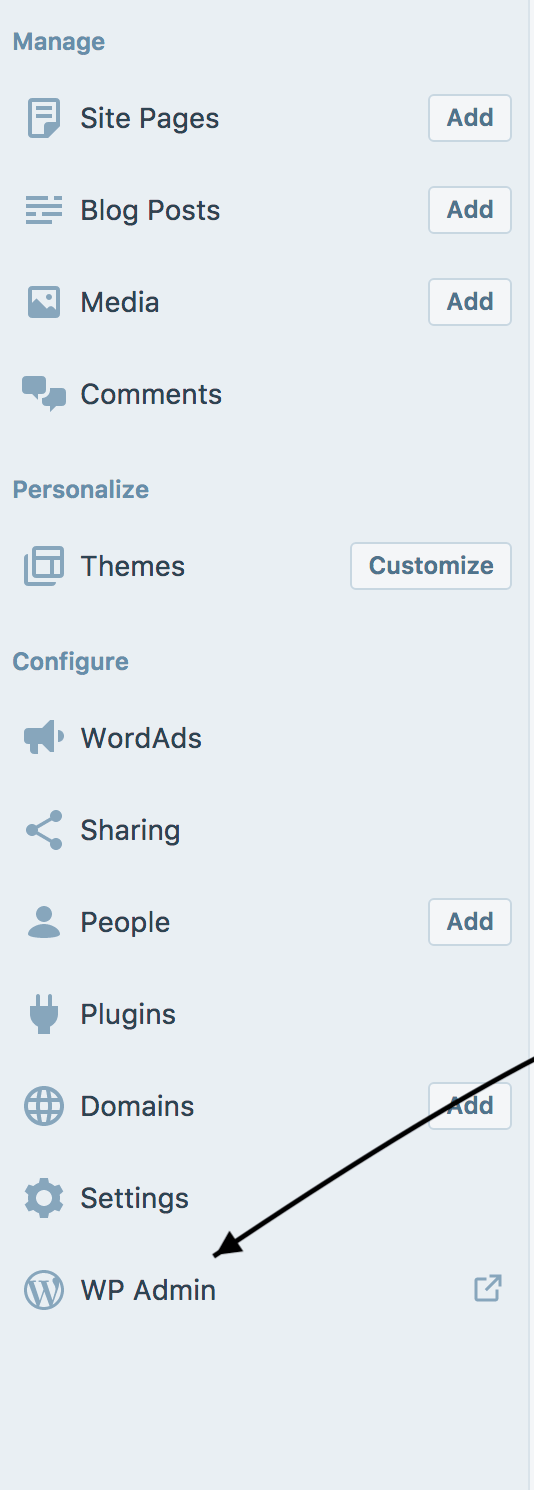 Where to find WP Admin on your blog’s dashboard
- Click on ‘Settings’
- Click on ‘Reading’
- Next to ‘For each article in a feed, show’ click the ‘Summary’ box.
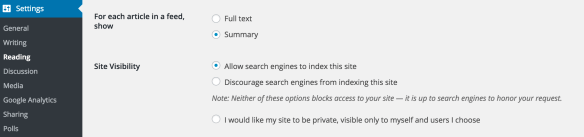
- Click on ‘Save Changes’ at the bottom of the page
Now, whenever you publish a new post, instead of the whole post being visible on the email (which followers can read without visiting your blog), they will need to click on the link in the email to be able to view and read the whole post on your blog. This will register as a new view in your blog stats.
Here’s an example of an email I…
View original post 70 more words


Thank you so much for sharing my post with your readers, Marcha. I hope it helps many of them get more traffic to their blogs.
Best wishes,
Hugh
LikeLiked by 1 person
I just changed my settings! The graphic and easy-to-understand directions made it simple.
LikeLiked by 2 people